How to Add Location Information to Mobile Content data sheet 5740 Views
Author:
Melissa Ulbricht
Abstract:
This how-to focuses on the tools and techniques that you can use to add location-based information to mobile content.
Location information can add value to your stories and content and can help journalists who report on specific communities, reporters who create venue-specific multimedia, or citizen journalists who cover events in which location is relevant.
Location information has many advantages: It provides more context. It helps journalists and publishers find an interested audience; users searching for information around specific locations will most easily find information that is tagged with a location. Location information lends itself to aggregation; content with location information can be put on maps and other visualizations, which makes it more appealing for audiences to examine. Through this, it can be used in pattern-finding. Aggregations may show interesting patterns that would not be evident from individual reports. Finally, location information can leverage social media.
Radio Azadi in Afghanistan Goes Mobile data sheet 4174 Views
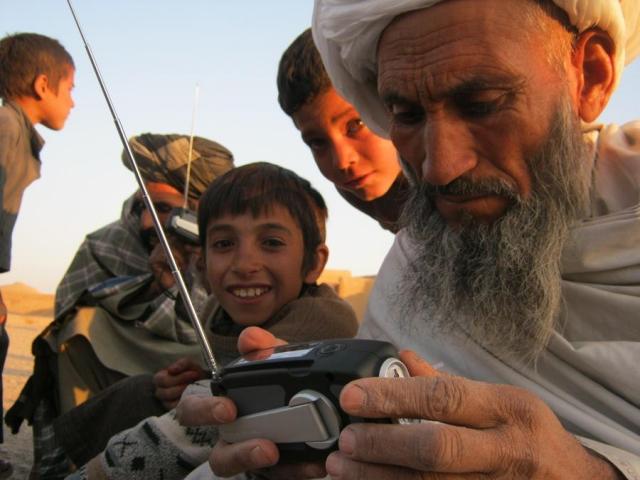
In Afghanistan, Radio Free Europe/Radio Liberty (RFE/RL) is three months into an interactive SMS service that allows listeners to access content and participate in the program via mobile phone.
Through the interactive SMS service, Radio Azadi is now able to both send and receive SMS messages from subscribers. As a news organization, the main goal of RFE/RL is reaching an audience. “We want to make sure our content is available on whatever platform Afghans want to consume it on,” Julian Knapp of RFE/RL said. The service allows listeners to become texters, and people around the country have sent in messages to the radio station, to the tune of about 200 messages per day.
Prabhas Pokharel contributed research and writing to this article.
We turn now from producing video on your mobile to audio to show you different ways that people are delivering content to mobile phones. Sending audio content can help you reach new and increasingly mobile audiences. It can also be a great way to reach semi- or illiterate populations or others for whom written content is not suitable.
There are many channels to deliver audio content to mobiles: calling listeners, providing numbers for them to call, having mobile web or app-accessible radio, or leveraging radios that are included in many mobiles. This post will focus primarily on projects and tools that use phone calls, or the "voice channel," to share content.
There are quite a few projects that disseminate audio content using the voice channel:
Many mobile phones can capture video footage. This has enabled both trained journalists and citizen reporters to more easily capture footage including images that were rarely seen before. The Polk Journalism Award in 2009, for example, was awarded to a video from Iran captured on a mobile phone. Today, more and more journalists are using mobile phones to record video and quickly transfer content to their newsrooms via mobile data connections.
Using mobiles to capture video isn't new news. But there is good news: You don't need a high-quality video camera to do high-quality reporting, be you in the U.S. or elsewhere. Many journalists and citizen reporters today use smartphones to capture video footage. Examples abound. Vancouver journalism students use an iPhone with some additional hardware and software to do all their video editing on the phone. Voices of Africa uses a Nokia N-series smartphone. In his book Mobile Journalism in the Asian Region, Stephen Quinn uses both iPhones and Nokia smartphones. This post will provide some tips and tools on how you can record quality video and audio from your mobile phone.
Make Sure Your Phone is Capable
Phone hardware is constantly improving and getting cheaper. With an older phone, you may consider video enhancement software, which can offer a cheaper way to get better quality video content. For high quality video recording on a mobile, the best phones available today feature 640 x 480 pixels at 30 frames per second. 320 x 240 pixels at 15 frames per second produces acceptable web-quality video.
Lower resolutions will look grainy and pixelated without software enhancement, and video below 15 frames per second will look choppy. On the high quality end, these are some good mobile phones with excellent video cameras:
PC Magazine featured these five video-phone models with varying price ranges. The article includes lengthy reviews and a matrix comparison of the phones.
The GSMArena.com database features 1800 phones with video capabilities, 70 of which are listed on this page. The site allows you to search for cameras based on various criteria and links directly to carriers around the world who are selling these phones.
The Nokia N series phones are generally highly recommended for video recording. The N82, N93, and N95 are mentioned often by independent reviewers.
Go Shoot (good) Video
When it comes to shooting video, the major difference between mobiles and mainstream camcorders is that mobile phones have simpler (and smaller) cameras. It is important to understand what makes for good quality video given these limitations. Some suggested tools and tips are listed here.
In Afghanistan, a documentary media company and an independent news agency have teamed up to integrate mobile phones and SMS into news reports. From election day text messages to stories of homemade airplanes, one news agency shows how a willingness to adapt mobile platforms to the landscape can contribute to a successful intersection of technology and media.
Small World News is a documentary and new media company that provides tools to journalists and citizens around the world to tell stories about their lives. Pajhwok Afghan News is an independent news agency headquartered in Kabul with eight regional bureaus and a nationwide network of reporters delivering stories in Dari, Pashto, and English. Together, the two launched Alive in Afghanistan, a website originally meant to showcase reports from the 2009 election in Afghanistan.
Mobile users can use a Ping application to post content via SMS and MMS. Ping supports iPhone, iPod Touch, WAP and SMS text messaging for US, Canada and Europe. Seesmic acquired Ping in January 2010. It is regularly adding social networks to those it already supports. Some main supported social networks include: Twitter, Facebook, Ning, Delicious and Flickr. It is free to sign-up for the service. There have been over 100 web and desktop applications created by third party developers.
Tool Category:
App resides and runs on a mobile phone
Key Features :
Ping.fm is a free social networking and micro-blogging web service that enables users to post to multiple social networks simultaneously.
Making an update on Ping.fm pushes the update to a number of different social websites at once. This allows individuals using multiple social networks to update their status only once, without having to update it in all their social media individually. Ping.fm groups services into three categories – status updates, blogs, and micro-blogs – and updates can be sent to each group separately.
Over 10,000 citizen reports relating to widespread flooding in Pakistan have been submitted across the spectrum of organizations using the SeenReport platform. The service allows anyone to create a profile and submit text, photos, and videos from a mobile phone for immediate publication on the Web.
The case study is part of the Mobile Media Toolkit that will include many other case studies, how-to guides, resources, and tools on how use mobile phones for reporting, content delivery, and citizen participation, to be puplished this Fall.
For citizen reporters, Fromdistance Mobile Citizen Reporter enables anyone with the application to send high-resolution images and videos from a mobile phone directly to a publisher or the web. This makes delivery quick and easy.
For publishers, Mobile Professional Reporter delivers content that is fit to the publisher's needs (video and images are automatically converted and resized) and the system is integrated with a publisher's existing content management system.
It also enables reporters and publishers to make themselves more accessible and better manage incoming content.
Fromdistance Mobile Journalism includes two tools: Mobile Citizen Reporter and Mobile Professional Reporter. For citizen reporters, Fromdistance Mobile Citizen Reporter enables anyone with the application to send high-resolution images and videos from a mobile phone directly to a publisher or to the web. Users may download the Mobile Citizen Reporter application for free.
For publishers, Mobile Professional Reporter delivers content that is fit to the publisher's needs (video and images are automatically converted and resized) and the system is integrated with a publisher's existing content management system. To become a publisher, a user must contact Fromdistance. Publishers can define their own terms of use for acquiring content (size and copyright, for instance). The service can work with large files.
For citizen reporters, Fromdistance Mobile Citizen Reporter enables quick and easy delivery in an all-in-one tool for citizen and independent journalists. Users may download the Mobile Citizen Reporter application for free. It supports all Nokia multimedia handsets and other Series 60 devices.
For publishers, Mobile Professional Reporter delivers content that is fit to the publisher's needs and the system is integrated with an existing content management system, making content delivery standardized and efficient. To become a publisher, a user must contact Fromdistance. Publishers can define their own terms of use for acquiring content. The service can work with large files.
Main Services:
Stand-alone Application
Tool Maturity:
Currently deployed
Platforms:
Other
Program/Code Language:
Other
Organizations Using the Tool:
The Fromdistance website says that "many leading media companies and publishers" have chosen the Mobile Professional Reporter tool, but it does not provide a list of company names. A datasheet also includes screenshots of use cases.
Your Smartphone is Now a Mobile News Studio data sheet 2583 Views
Author:
Tiffany Campbell
Publication Date:
Jan 2010
Publication Type:
Other
Abstract:
Mobile phones have become a critical mobile news reporting tool. They can be a very effective way to produce content and transmit that content back to the studio very cheaply. The presentation presents real world examples of how mobile phones have been used in reporting contexts to great effect, tools that can help reporters do this reporting, and things to keep in mind (such as battery levels). The presentation also includes the author's recommendations for the best apps for mobile journalism.
As a part of the Mobile Media Toolkit, we are producing how-to screencasts that show how to use various mobile tools that have to do with the production and dissemination of content and media.
I argued recently that content publishers should publish for the mobile web rather than build more apps. So it only felt appropriate to do a how-to screencast on how to actually produce content for the mobile web. One way is to use the polular and open source blogging software Wordpress as the back-end of the website, and optimize it so the front end is suitable for mobile viewing. We help viewers go through this process in a brief how-to screencast. See it below or click through to the How To article.
How to Mobile-Optimize a Wordpress Website data sheet 12484 Views
Author:
Prabhas Pokharel
Abstract:
Publishing for the mobile web is an important way to reach audiences on mobile phones. This screencast demonstrates an easy-to-use tool that can enable many content producers pubish for the mobile web. Wordpress.org has developed software which lets many around the world create websites fairly easily. This tool, the Wordpress Mobile Pack, makes it easy for those content producers to also publish on the mobile web.
In this short how-to video, we show how easy it is install the Wordpress Mobile Pack and generate a mobile version of websites, along with pointers to the more advanced features of the software.
Publishing for the mobile web is an important way to reach audiences on mobile phones. This screencast demonstrates an easy-to-use tool that can enable many content producers pubish for the mobile web. Wordpress.org has developed software which lets many around the world create websites fairly easily. This tool, the Wordpress Mobile Pack, makes it easy for those web publishers to now publish on the mobile web.
In this short how-to video, we show easy it is install the Wordpress Mobile Pack and generate a mobile version of websites, along with pointers to the more advanced features of the software.
There is a need for tools that let publishers create mobile-optimized websites that are also easy to edit and upload content to. In particular, tools that integrated with existing solutions (like Wordpress.org publishing software) to create mobile websites are needed.
This plug-in takes a Wordpress.org-based site, and mobile-optimizes it. The back-end remains the same as Wordpress.org and is therefore easy to edit and upload content to. The desktop version of the site remains the same as well. What the plug-in adds is the ability for mobile viewers to see a website that is easy to navigate on a mobile handset. Auto-detection of mobile phones, conversion of widgets, and many more features are included.
Tool Category:
App resides and runs on a server
Key Features :
Adds a mobile switcher so mobile viewers are redirected to a mobile-optimized theme.
Adds several mobile-optimized themes to the set of themes available on Wordpress.
For webkit-enabled devices, has an advanced theme that takes advantage of those features.
Provides a mobile admin panel so the blog can be administered using a mobile phone.
Mobile ad widgets that are easy to integrate with Admob and Google Ads.
[Updated with images] In Grahamstown, South Africa, getting and sharing news is a mobile experience.Grocott’s Mail, a local paper, incorporates mobile phones into many aspects of its news service – from disseminating headlines via SMS, to encouraging readers to text in their opinions, to a Knight Challenge-winning citizen journalist training program.
We have another new case study up where we report on an innovative audio-based citizen journalism project in Chhattisgarh, India. Tribal citizen journalists have been reporting news in their own languages through a new service called CGNet Swara. CGNet stands for Chhattisgarh Net). The service allows citizen journalists to call in and record news in one of four local languages. The news that has been produced has been picked up in India's mainstream media, and some reports have led to concrete action: in one case, teachers whose salaries hadn't been paid for months were paid after a news report elicited a calling campaign from listeners. We've previously mentioned the project in a short blog post. This much more extensive case study is a part of some work we have been doing on citizen media projects using audio, radio, and mobile
Kenya Connected: Mobile Technology is Linking Journalists to Local Sources data sheet 2411 Views
Author:
Camilla Karlsen
Publication Date:
Jun 2010
Publication Type:
Report/White paper
Abstract:
This study explores how news journalists' working conditions are changing in an African developing country due to the growth in information communication technologies (ICTs). The special focus is set on news journalists' use of mobile technology because the rate of mobile penetration in to Africa is so significant these years that the region is actually driving the mobile market’s growth worldwide with a teledensity of over 50%. Although mobile technology has been in the Africa continent for almost two decades it is only within the last two to five years that people have made regular use of these technologies due to recent improvements in accessibility and cost-efficiency.
Interviews with several Kenyan news journalists and other media actors conducted in January and February 2010 were used as the prime empirical data in the study. Thus, to the extent that mobile technology has an effect on the journalistic working process, the following problem statement and research questions served as a guide for this study and were answered in the analysis that drew upon the theoretical framework of journalistic working processes, gatekeeping theory, disruptive technologies, and ICT for development (ICT4D):
• PS: How do Kenyan news journalists use mobile phones in their work? • RQ1: In which ways does mobile technology affect the journalistic working process? • RQ2: How does mobile technology affect public interaction with the news media?
The findings suggest that Kenyan news journalists use mobile technology in several ways in their work: they set up interview appointments by calling their sources; they conduct telephone interviews; they record interviews using the mobile phone’s microphone which is particularly useful in conflict-sensitive reporting; they send Internet links to their sources whom can read the online news from their mobile phone’s browser. The consequences of journalists’ use of mobile phones are, for instance, that in the past two to five years mobile technology has linked journalists with sources from Kenya's remote areas and enabled the news media to publish reliable stories which would have been difficult to verify a few years ago. Also, the Kenyan public has gained easy access to the news media, for example by participating in radio call-in shows and the information they provide is sometimes researched by journalists and turned into news stories. The traditional gatekeeper role of the press has changed to fact controller, and it is likely that the public's knowledge contribution can help to promote democracy in the country.
We are very interested in the role of mobile phones in citizen media, including how mobile phones can function as a portable newsroom or radio studio. To that end, our latest how-to guide, Mobile Audio Recording in the Field (and how to get a clear sound on the streets), walks you through the process of recording audio content on your mobile phone, whether you are recording from a studio, your home, or in the field.
This how-to is part of the Mobile Media Toolkit, which includes many other case studies, how-to guides, resources, and tools to use mobile phones for reporting, content delivery, and citizen participation.
Mobile Audio Recording in the Field (And How to Get a Clear Sound From the Streets) data sheet 22978 Views
Author:
Melissa Ulbricht
Abstract:
This How-To article provides tips for recording and sharing clear-sounding audio from a mobile phone. Often, recording on a handset is done in less-than-ideal environments. This article offers recording tips to help you capture quality audio to ensure a clear sound, even when you report on the ground and outside of a professional recording studio. We'll describe the best way to create, share and edit audio content depending on what resources you have (or do not have). You will also find a brief outline of some of the most popular and easy-to-use tools for creating, editing, and sharing audio content.
Your mobile phone is an instant audio-recording and storage device, and it can be used anywhere. This How-To article provides tips for recording and sharing clear-sounding audio from a mobile phone. Often, recording on a handset is done in less-than-ideal environments. This article offers recording tips to help you capture quality audio to ensure a clear sound, even when you report on the ground and outside of a professional recording studio. We'll describe the best way to create, share and edit audio content depending on what resources you have (or do not have). You will also find a brief outline of some of the most popular and easy-to-use tools for creating, editing, and sharing audio content. Some tools require a specific call-in number and thus are geographically limited in scope. Other tools are Internet-based and widely available while others are specific to smartphones or iPhones. This article will give you a solid overview of what is available depending on your locale and resources, and will offer guidance for further tips and techniques.
A recently launched campaign at a popular youth radio program in Nepal focuses on the voices of youth - or at least, text messages of youth. Regardless, the SMS campaign seems to be making strides.
UNICEF in Nepal has teamed up with the popular Nepali radio program Saathi Sanga Man Ka Kura, which means "chatting with my best friend." The program, also called SSMK, is run by the non-governmental organization Equal Access Nepal. SSMK has been on the air for 10 years and reaches millions of youth listeners (primarily ages 13 to 26) throughout Nepal. In April, UNICEF and SSMK launched a campaign that allows young listeners to take an active role in a conversation, all via SMS.
Rupa Joshi, a communications specialist with UNICEF, explains the origins of the campaign.
The Mobile Phone and the Public Sphere data sheet 4832 Views
Author:
Janey Gordon
Publication Date:
Jun 2009
Publication Type:
Journal article
Abstract:
This article seeks to explore the influence of the mobile phone on the public sphere, in particular with regard to its effect on news agendas, gatekeepers and primary definers. Using the examples of the Chinese SARS outbreak (2003), the south-east Asian tsunami (December 2004), and the London bombings (July 2005), the author questions the extent to which the mobile phone is challenging conventional and official sources of information.
At times of national and personal calamity, mobile phone is used to document and report events from eyewitnesses and those closely involved. Using multimedia messages (MMS) or text messages (SMS) to communities of friends and families, as well as audio phone calls, mobile phone users may precede and scoop official sources and thwart censorship and news blackouts. They can also provide valuable evidence of what actually occurred. Users are able to take pictures and short films and transmit these rapidly to others along with reports of what is happening where they are; they are also able to access other media broadcasts and the internet. They are what have become known as `citizen journalists'.
The evidence suggests that mobile phone usage is contributing to the public sphere and in some instances is circumventing official repression or inadequate information. There is also an indication that the `mobcam' is capturing images that would otherwise be lost. However, the mainstream media has been quick to take advantage of this citizen journalism and mediate it within its own parameters.
Bubbly is a voice-blogging service for mobile phones where individuals and celebrities record voice updates heard by friends, family, fans and followers. Bubbly is like Twitter with a voice and is bringing social networking to mobile phones. Bubbly's mobile operator partners include: Airtel, Vodafone, Turkcell, Digi, Indosat, AIS, CSL/New World Mobility.
Tool Category:
App resides and runs on a mobile phone
Key Features :
Venturebeat has covered Bubbly and the service has gained 500,000 users in India. "Bubbly is cell phone service that aims to bring social media to the masses. It builds on the foundation set by Bubble Talk, which has 100 million users who use the service to send voice messages to on other individuals. With Bubbly, messages go to a bigger audience — followers." By offering features that drive phone usage (text and voice), operators are able to use Bubble Motion to drive new sources of revenues that have previously been untapped.
I had the pleasure of attending the Global Voices Citizen Media Summit in Santiago, Chile last week. The summit brought together bloggers, activists, and thinkers working to advance citizen media all around the world. While the discussions that took place were informative, most presentations and panels fell short in recognizing the role mobile phones have played and exploring the potential mobile phones can play in citizen media. I'd like to highlight some of the potential for mobiles in citizen media that were not adequately discussed.
At the recent Global Voices Citizen Media Summit in Santiago, Chile, I facilitated as session on "Mobile Phone as a Tool for Reporting." We started off the discussion with the question of whether SMS is useful for reporters.
David Sasaki of Global Voices expressed skepticism about SMS as a reporting tool. Sasaki noted that Rising Voices, a Global Voices project that provides small funds to budding citizen media projects, had tried to find an SMS or mobile-based reporting project to fund, but hasn't been able to. Instead, David saw projects using technologies like Twitter for reporting. The 160 characters of SMS messages is simply not enough, David proposed, and pointed out that similar technologies like Twitter are more useful because they are able to transcend the character limitations as they can include links to much lengthier content.
This tool lets users record and edit audio files on mobile phones. This is useful for reporters, for example, who need to turn raw audio files into into news stories in the field. Files can then be sent instantly over WiFi or a cellular connection to an editor or upload to a website.
VC Audio Pro is an advanced mobile journalism tool for radio news. It allows users to record, edit and send professional quality audio news clips or full stories from their smartphones.
Tool Category:
App resides and runs on a mobile phone
Key Features :
VC Audio Pro enables journalists to record and edit audio into a news story on the go. It replaces cumbersome and costly recording equipment. The company claims that the tools has an easy-to-use interface that is compatible with newsroom systems for instant integration and playout. There are some workflow customization options as well.
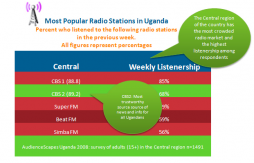
Finding data on media consumption can be difficult, but the real trouble comes in interpreting it – what does it mean if people in one country get most of their news from radio, while in another from television? How are mobile phones changing the media and communications landscape? How can this data be used to help keep the greatest number of people informed? And why does this information matter?
AudienceScapes, a project of InterMedia, tracks media and ICT consumption in developing countries around the world. Currently the site has detailed information about Ghana, Uganda, Kenya, Sierra Leone, Columbia, Nicaragua, Guatemala and Peru. The site is a useful resource for detailed breakdowns on how different communities are using and consuming media.
 Location information can add value to your stories and content and can help journalists who report on specific communities, reporters who create venue-specific multimedia, or citizen journalists who cover events in which location is relevant.
  In Afghanistan, Radio Free Europe/Radio Liberty (